Agent Fabric introduces a declarative deployment model that's completely different from the classic MuleSoft deploy. You define your entire agent network in a single YAML file, hit Deploy in Anypoint Code Builder, and the platform provisions Exchange assets, API Manager instances, and Omni Gateway routes automatically. This article covers what's inside the YAML, what gets created without touching a single UI manually, and four things that will surprise you the first time you deploy.
Last month I deployed my first Agent Network on MuleSoft. I expected to configure a few settings, upload something, click Deploy. That's how MuleSoft has always worked.
What actually happened was different. I hit the deploy action inside Anypoint Code Builder, and the platform created assets in Anypoint Exchange, my LLM proxy, my AI agent, my MCP server, a new agent broker, and registered all of them in API Manager. Without touching any of those UIs directly.
That shift matters. Agent Fabric doesn't just add new asset types. It changes what "deploy" means.
The Classic MuleSoft Deploy
In standard MuleSoft, deploying is about shipping a runtime artifact.
You build your Mule application, get a JAR, deploy it to CloudHub 2.0 (or RTF or on-prem) via Runtime Manager. If you want API management on top, you register it separately in API Manager and apply policies there. Every piece is independent, you wire the app, the API instance, and the policies together yourself, in separate UIs.
It works. But every component is a manual decision, a separate step, a separate screen.
The Agent Fabric Way: One YAML, One Deploy
Agent Fabric is declarative. Your entire agent infrastructure, agents, LLM connections, brokers, policies, lives in a single YAML file called agent-network.yaml. When you deploy from Anypoint Code Builder, the platform reads it and provisions everything.
The file has five top-level sections:
schemaVersion: 1.0.0
label: My Agent Network

brokers:          # The entry point agents exposed on Omni Gateway
  broker1:
    card:         # The A2A agent card, name, skills, protocol version
      protocolVersion: 0.3.0
      skills:
        - id: echo
          tags: [echo]
    spec:
      llm:        # Which LLM provider and model this broker uses
        ref:
          name: my-llm-provider
      links:      # Which downstream agents this broker can call
        - agent:
            ref:
              name: my-ai-agent
      policies:   # Policies applied automatically on deploy
        - ref:
            name: client-id-enforcement
          configuration:
            credentialsOriginHasHttpBasicAuthenticationHeader: customExpression
            clientIdExpression: "#[attributes.headers['client_id']]"

agents:           # External AI agents referenced by this network
  my-ai-agent:
    metadata:
      protocol: a2a

llmProviders:     # LLM endpoints the network can use
  my-llm-provider:
    label: My LLM Proxy

connections:      # Runtime URLs and credentials for agents and LLMs
  agent-connection:
    kind: agent
    spec:
      url: ${agent.url}
  llm-connection:
    kind: llm
    spec:
      url: ${llm.url}
      configuration:
        apiKey: ${llm.apiKey}
In Anypoint Code Builder, you right-click the project and choose Publish Agent Network, then Deploy Agent Network. The platform runs the full sequence under the hood.
What the Platform Creates Automatically
After the deploy, I opened Anypoint Exchange. There were assets I never manually created:
| Asset | Type |
|---|---|
| My AI Agent | agent |
| LLM Proxy | llm |
| MCP Server | mcp |
| Agent Broker | agent (broker) |
| Agent Network app | agent-network |
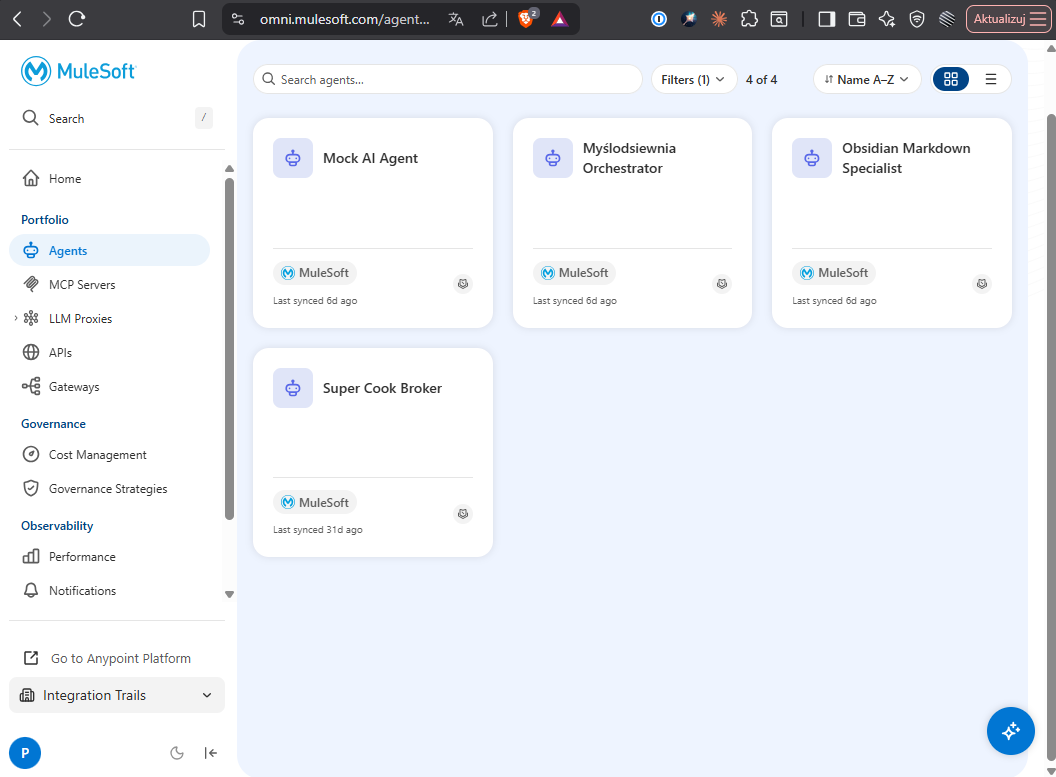
In API Manager: each asset appeared as a registered instance, already assigned to Omni Gateway, with the consumer endpoint set and the declared policies applied.
In Runtime Manager: the broker application was deployed and running.
I didn't configure any of this manually.
ACB detects whether a publish is needed before deploy. If you go straight to Deploy without publishing first, it runs the publish step automatically, the sequence is handled for you.
Four Things That Will Surprise You
Policies defined in YAML overwrite manual changes
If you modify a policy directly in API Manager after deploy, change a parameter, add a new one, it will be reverted on the next redeploy. API Manager shows a warning on every policy attached to an Agent Network project:
"This instance comes from an agent network project. Policy changes made here will be reverted next time it gets redeployed."
The YAML is the source of truth. Treat API Manager as a read-only view for anything managed by an Agent Network.
Sensitive properties need explicit flagging in exchange.json
The exchange.json file controls how deployment variables appear in the deploy UI. You can mark sensitive values with "secret": true and Runtime Manager will mask and encrypt them automatically, no extra setup required.
"variables": {
  "llmProxy": {
    "apiKey": {
      "description": "API Key for the LLM Proxy",
      "default": "",
      "secret": true
    }
  }
}
Without this flag, the value appears in plain text in the UI. With it, it's encrypted at rest and masked in all views.
Base path matters more than it looks
When the deploy registers your broker in API Manager, it needs a specific base path on Omni Gateway. If you leave it as /, the gateway routes all traffic, including requests meant for every other API, to that broker.
Always set a dedicated path like /broker1 or /mock-ai-agent. It's a one-liner in the YAML but the consequences of getting it wrong are hard to debug.
Policy configuration is not in the docs, use the schema
Adding policies in agent-network.yaml requires the exact property names from the policy JSON schema, not what you see in the API Manager UI form. For client-id-enforcement, the required properties are credentialsOriginHasHttpBasicAuthenticationHeader and clientIdExpression. I found them through trial and error, the validation error at least tells you exactly what's missing:
"errorMessage": "must have required property 'credentialsOriginHasHttpBasicAuthenticationHeader'"
Don't guess policy configuration from the API Manager UI. In Anypoint Code Builder, use "Add Exchange Assets to Project", search for the policy, add it to the project. The schema gets included locally and the build step validates your configuration before deploy. It's faster than reading error messages one by one.
Before You Deploy: Prerequisite Checklist
A few things I had to set up before the deploy made sense:
- Your mock agent (or real agent) must be deployed and have a reachable public URL, the Agent Network references it by URL in
connections - The agent asset must already exist in Anypoint Exchange with type
agentand a validagent-card.json,protocolVersion: "0.3.0"is required, without it Exchange rejects the publish - Skills in the agent card require a
tagsarray, even an empty one causes a publish error - An Omni Gateway must exist in your environment
The deployment flow assumes your agent app is deployed independently first. The Agent Network project doesn't deploy the agent app itself, it registers it and wires it into the broker. Deploy the agent app to CloudHub separately, then reference its URL in connections.
The Mental Model Shift
Classic MuleSoft deploy: you build an app, then separately configure everything around it.
Agent Fabric deploy: you describe the full architecture in YAML, and the platform builds everything around your app.
The difference is not just convenience. When the infrastructure is declared in code, it's versioned, repeatable, and reviewable. You can diff the YAML between deployments and know exactly what changed. You can redeploy from scratch in a new environment without clicking through six UIs. The YAML is the documentation.
It's a different way of thinking about infrastructure, and once you've worked with it, going back feels like the old way.
Key Takeaways
- YAML is the source of truth. Everything in
agent-network.yamlgets provisioned automatically. Manual policy changes in API Manager are overwritten on the next redeploy. - One deploy, many assets. Publish + deploy from ACB = Exchange assets (agent, LLM, MCP server, broker), API Manager instances, Omni Gateway routes, Runtime Manager deployment, all provisioned automatically.
- Flag secrets in exchange.json. Use
"secret": truefor automatic masking and encrypted storage in Runtime Manager. - Get policy schemas from ACB, not the docs. Use "Add Exchange Assets to Project" to get the exact configuration properties each policy requires.
Ready to build this yourself?
Free account, hands-on modules, real MuleSoft projects. No fluff — just practice that moves your career forward.