When people hear "DevOps Engineer," they typically think of someone managing cloud infrastructure, automating pipelines, and ensuring deployments go smoothly. However, when you step into the world of Integration, the role of a DevOps Engineer takes on a distinct and more complex flavor. Integration DevOps is not just about deploying code - it's about understanding how systems, data, and business processes connect and operate within a highly interdependent environment.
Alright alright, but what should I do to become an Integration DevOps Engineer?#
Integration Basics (Development and Architecture)
Understanding how integration platforms work - from ESBs to API Gateways to Message Brokers, each with a distinct role in distributed system communication - is essential. Your job is not just to deploy artifacts but to keep the entire communication layer alive. Learn the basics of integration patterns like request-response, publish-subscribe along with foundational techniques like message routing, content-based routing, and data transformation. They will make your work much easier when dealing with real-life flows, errors, and dependencies. You don’t need to be an integration developer - but you must understand what’s flowing through your pipes. It certainly won’t hurt to know the technology you’re working on. Also, to automate deployment you have to know HOW it works underneath.
Basics of Development - and the More, the Better
Knowing how to write code helps far beyond scripting. Understanding control structures, data manipulation, error handling, and programming logic will make your daily life smoother. Even if you don’t plan to write production-ready applications, development basics help you debug, automate, and collaborate with developers effectively. The more you know, the more natural troubleshooting and automation will become.
Git
This deserves a separate point - there’s no shortcut here. Git is one of the core DevOps tools. Learn branching strategies, branch protection, pull requests, and how Git integrates with CI/CD processes. And please, stick to the Git CLI. GUI tools might look fancy, but they still rely on CLI under the hood. The difference? With CLI, you know exactly what’s happening, which will save you more than once when things go sideways.
CI/CD and Automation
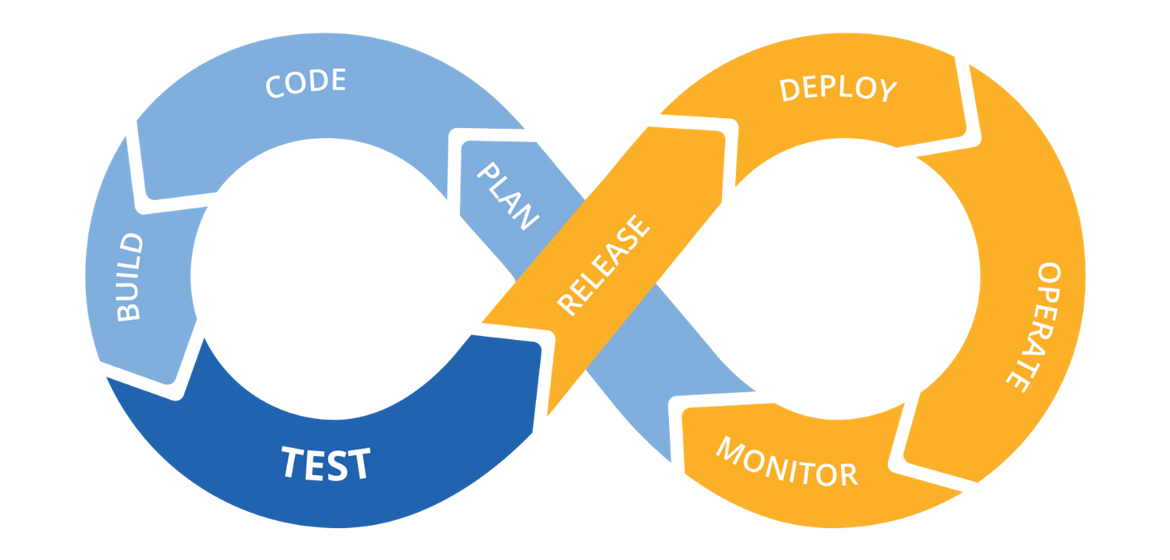
CI/CD: Continuous Integration and Continuous Delivery or Deployment, definition and differences in upcoming article.
It's not about pushing code - it's about doing it safely, consistently, and predictably. Learn how to build, maintain, and improve CI/CD pipelines (GitHub Actions, Jenkins, GitLab CI, Bitbucket Pipelines, Azure DevOps, TeamCity). Understand deployment automation with proper rollback strategies. Don't forget infrastructure automation (Terraform, Ansible, cloud-native tools) - you will need it sooner than you think.
Programming
Automation doesn't exist without scripting. Bash or Python is the bare minimum, but any scripting language will help. Expect to write custom plugins, integration utilities, or one-off scripts - for Zabbix, Jenkins, or your platform-specific tasks.
Operating System
Linux is everywhere - cloud, on-prem, containers, integration platforms. Learn how to navigate and live in the terminal. I guarantee you won’t see “X11” pop up when production crashes at 3 AM. Terminal skills make scripting faster and troubleshooting easier. And yes - sometimes you’ll touch Windows too. So grab at least the basics of PowerShell and learn how Windows Services work. It might save you one day.
Security Fundamentals
Security is part of the integration playground. Learn about authentication, authorization, encryption, and certificate management. Most incidents aren’t caused by failed logic - but by missing certificates, expired tokens, misconfigured security settings, or unprotected APIs.
System Communication
Integration is all about communication. Learn how APIs work (REST, SOAP, GraphQL) and how systems talk to each other. Messaging systems like Kafka, RabbitMQ, or Solace will be your daily companions. It’s impossible to troubleshoot integration flows without understanding who talks to whom, how, and when.
Networking and Network Protocols
Networking is everywhere in integration. You don’t have to become a network engineer, but you must understand:
- how basic network protocols work (TCP/IP, HTTP, TLS, DNS),
- how to troubleshoot connectivity issues,
- how firewalls, VPNs, load balancers, and proxies affect system communication. Without these skills, diagnosing incidents or even configuring simple integrations will become a guessing game. Good DevOps Engineers spot network issues faster than most developers or even administrators.
Monitoring and Observability
Monitoring is not just about keeping dashboards green. It’s about knowing when things are about to break, not when they already did. Learn Prometheus, Grafana, Cloud Monitoring, or Zabbix. Understand logging, tracing, and alerting - this is your toolbox for early detection and incident response.
Observability takes it a step further. It's about making the right things visible. Log what matters, where it matters:
- Log inputs and outputs around key integration points and external dependencies.
- Capture slow or fragile flows - message queues, retries, third-party APIs.
- Use proper log levels:
infofor flow,warnfor degradation,errorfor actual failures. - Keep logs structured and searchable. And don’t log sensitive data.
- Above all: log with context. Think about what you’d need to debug a broken flow at 2 AM.
Good observability isn’t noisy - it’s intentional.
Business Awareness
You don’t have to be a business owner or architect, but you must understand why these systems are connected in the first place. Learn to recognize which systems are critical, what depends on what, and how changes affect the business. You will make better decisions, safer deployments, and more reliable fixes if you know the business impact of what you are doing.
Soft Skills
You’ve built pipelines and automated almost everything? Great. Now make sure everyone understands what’s going on inside your platform. How are new features supposed to be delivered? How are bug fixes applied? Where should the business team send their feedback or change requests? Automation alone is not enough - clarity, documentation, and communication are the key to keeping the platform usable and the teams aligned. So learn how to coordinate releases, handle incidents, and interact with business and technical teams alike.
But there’s more: as a DevOps engineer, your role often includes spreading the DevOps mindset within the integration space - especially early on. That means enabling others to gradually adopt delivery best practices, take ownership of deployability, and understand how changes move through the system.
You're not just building systems - you're building habits across the organization.
The phases of introducing DevOps - from initial enablement to shared ownership across teams - will be explored in a future article.
Integration DevOps - An Invisible Role Until It Isn't#
While the Integration DevOps role is often underestimated or even questioned - "if everything works, why do we need DevOps?" and "if it doesn't, what did DevOps even do?" - the true value of this role usually becomes evident after the first major incident or failed deployment that could have been easily avoided with an experienced engineer in place.
Moreover, having a dedicated DevOps Engineer is not just about solving problems; it's about influencing the entire team. Over time, the DevOps mindset naturally spreads across developers, testers, and release managers. After all, DevOps is never a one-person job - it is a way of working that the whole team must adopt in their daily routines.